
Key Takeaways
- Start with a decision: Write your survey goal as the decision you need to make, then only ask what changes that decision.
- Get the right people: Sampling (who you invite) affects accuracy more than fancy charts. Decide your audience and target completes early.
- Use answerable questions: Favor specific timeframes, one idea per question, and consistent scales; include open-ended items only when you will use the verbatims.
- Boost response without tricks: Send a clear invitation, 1-2 short reminders, and (when appropriate) a small incentive. Make the survey mobile-friendly and fast.
- Report in a repeatable way: Clean the data, summarize key metrics, compare groups, and end with 3-5 actions tied to the original decision.
For a first survey, follow the step-by-step survey setup guide. For an existing project, use the sections below to check the question flow, invitations and results. Start with the stage where you are having trouble, then work through its checklist.
A good online survey is a structured set of questions that a specific group of people can answer quickly and honestly, producing results you can act on.
Survey lifecycle at a glance (10-minute overview)
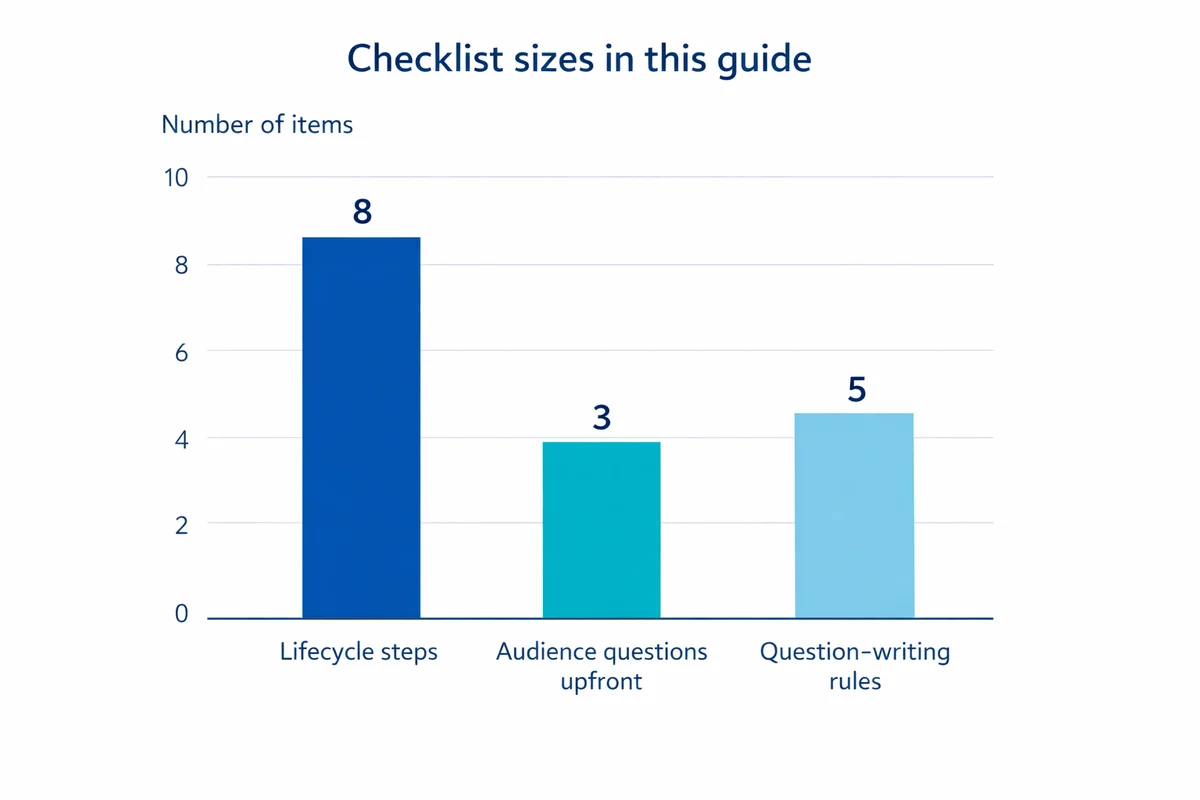
Most online survey problems come from skipping a step. Use this end-to-end flow as your project map:
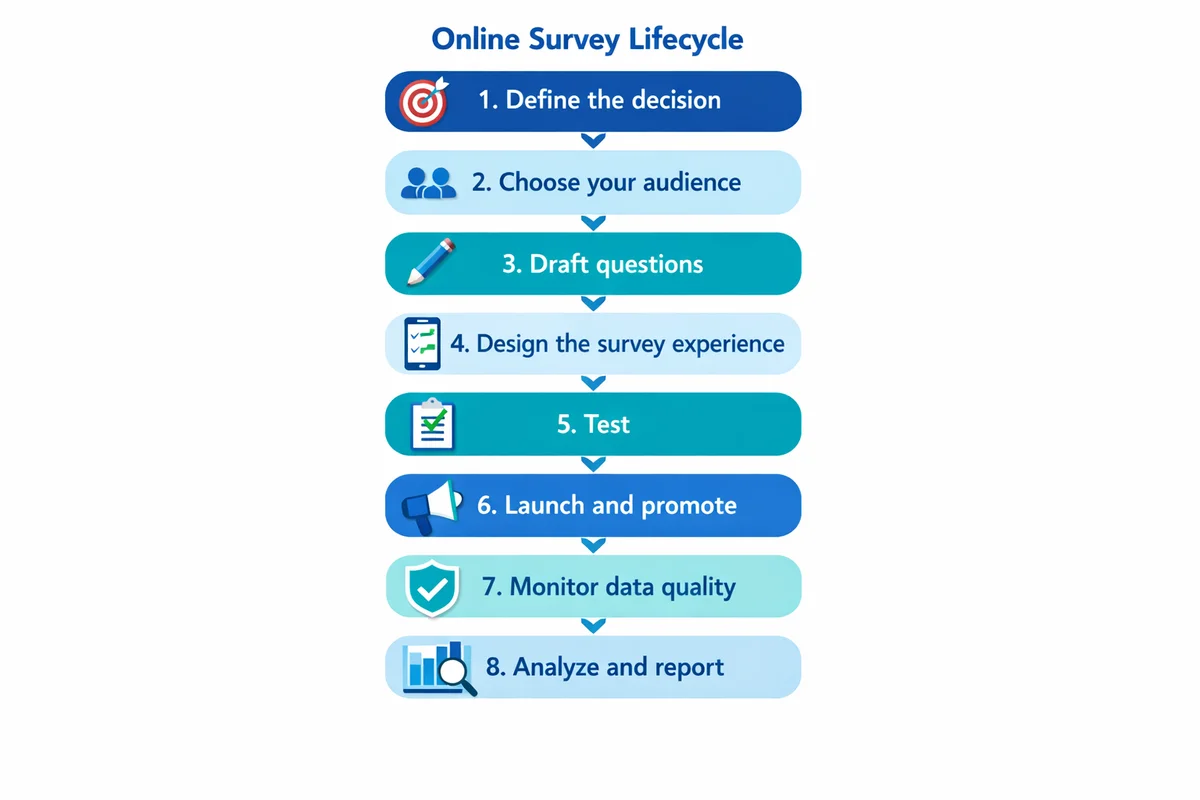
Define the decision
Write a one-sentence decision statement and success metric.
Choose your audience
Decide who must be represented, how you will reach them, and your target number of completed surveys.
Draft questions
Use clear wording, one idea per question, and answer choices that fit the question.
Design the survey experience
Keep it short, mobile-friendly, and logically ordered with skip logic where needed.
Test
Run a quick pilot, fix confusing items, and verify tracking/exports.
Launch and promote
Send an invitation people trust, then follow with reminders.
Monitor data quality
Watch for duplicates, speeders, straight-liners, and suspicious open-text patterns.
Analyze and report
Summarize, compare key segments, and translate findings into actions.
Start with a decision (purpose, scope, and success)
Before you write a single question, write down the decision the survey will support. This keeps your survey short and makes the results easier to interpret.
Use a one-sentence decision statement
Template:
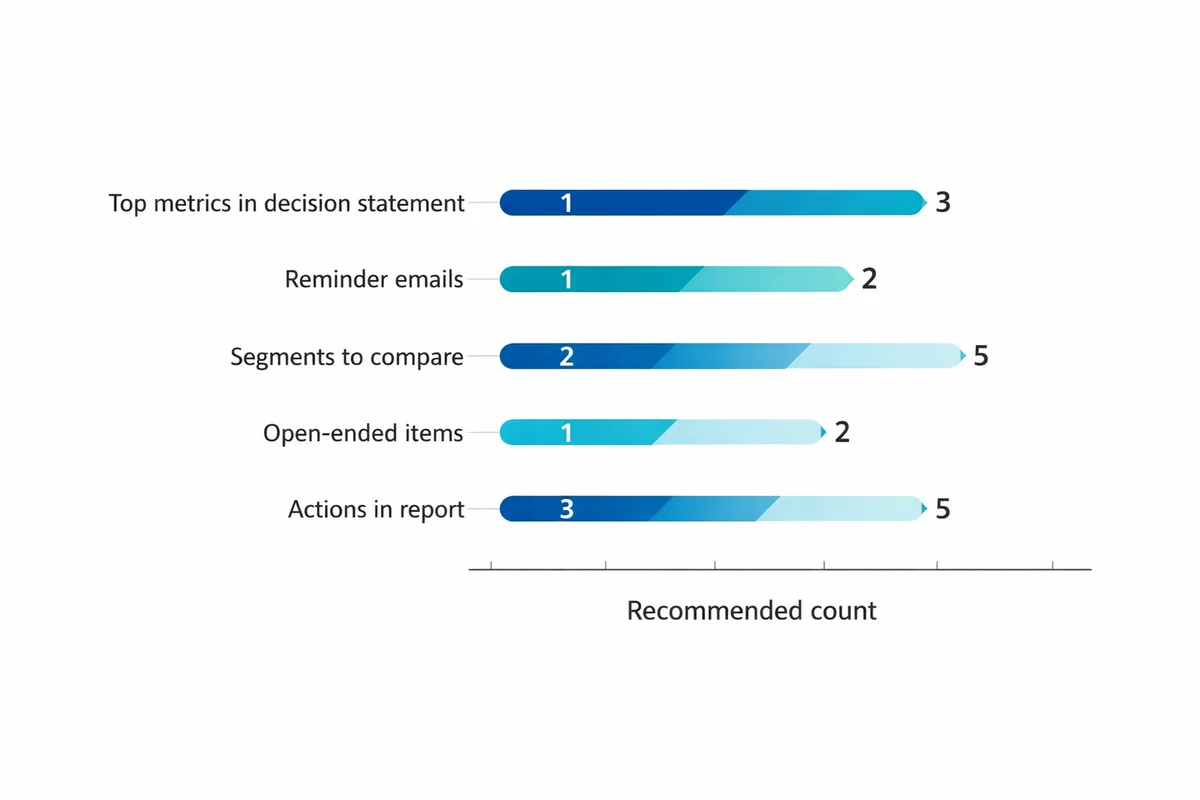
We will use this survey to decide [what decision] for [which group] by [date], using [top 1-3 metrics].
SuperSurvey planning template
Example (customer feedback):
Decision statement: We will use this survey to decide which onboarding changes to ship next quarter for new customers, using time-to-value satisfaction and top friction points.
Decide what not to measure
Scope creep is the fastest way to create a long, low-completion survey. If a question will not change your decision, cut it or move it to a future survey.
If you are surveying a common scenario (employee pulse, training feedback, customer satisfaction), start from survey templates, then edit questions to match your decision statement.
Choose who to survey (sampling) and how many completes you need
Good survey results come from the right respondents, not just more respondents. Start with sampling basics: who is in your target population, and how will you reach them?
Three audience questions to answer upfront
- Who must be represented? (e.g., new vs. long-term customers, regions, departments)
- How will you contact them? (email list, in-app intercept, SMS, panel)
- What will you do about nonresponse? (reminders, alternate channels, weighting, or a caveat in reporting)
How many responses do I need?
There is no single magic number, but you can set a defensible target based on how precise you need to be and which subgroups you plan to compare. Use our sample size basics to pick a target completes number, then work backward to estimate how many invitations you need.
| If your goal is... | A reasonable target approach | Watch out for |
|---|---|---|
| A single overall score (e.g., satisfaction) | Pick a completes target that gives stable overall percentages week to week; then prioritize representativeness over volume. | Over-interpreting tiny changes when your audience mix shifts. |
| Comparing 2-5 segments | Set a minimum completes goal per key segment (not just overall). Oversample small segments if needed. | Segments with very low n (sample size) producing misleading swings. |
| Finding top issues | Prioritize coverage across the audience and include 1-2 open-ended items for detail. | Too many open-ended questions creating analysis backlog. |
Draft questions people can answer (with good vs bad examples)
Question wording is where most survey error is introduced. If you want deeper guidance, see how to write survey questions for more patterns and pitfalls.
Five rules that prevent most problems
- Ask one thing at a time: Avoid double-barreled questions (two topics in one).
- Specify a timeframe: "In the last 30 days" beats "recently."
- Use plain language: Replace internal jargon with the words respondents use.
- Make options match the question: Mutually exclusive, collectively exhaustive choices when possible.
- Include a legitimate "not applicable" when needed: Do not force an opinion from people without the experience.
| Problem | Avoid (example) | Use instead | Why it is better |
|---|---|---|---|
| Leading language | "How helpful was our excellent support team?" | "How helpful was our support team?" | Removes the implied "correct" answer. |
| Double-barreled | "How satisfied are you with our pricing and features?" | Two questions: "...pricing" and "...features" | Lets people answer accurately. |
| Vague timeframe | "How often do you use the dashboard?" | "In the last 7 days, how many days did you use the dashboard?" | Anchors recall and reduces guessing. |
| Unclear terms | "Was implementation successful?" | "Did you complete setup and start using the product for real work?" | Defines "success" in observable terms. |
| Missing response option | "Why did you cancel?" (required) | "What was the main reason you canceled?" + "Prefer not to say" | Respects privacy and avoids drop-off. |
Closed-ended vs open-ended: when to use each
Closed-ended questions (multiple choice, scales) are easier to analyze. Open text can explain the "why," but it costs time to code and summarize.
Use open-ended questions when you need discovery (unknown issues, new ideas) or when you must capture respondent language for product/service improvements.
For most general-purpose online surveys, keep open-text to 1-2 questions. Add more only if you have a plan to review and code the verbatims quickly.
Design rating and Likert scales that behave consistently
Scales are where small design choices cause big measurement noise. If you use agreement items, review Likert scale guidance. For other formats (stars, 0-10, 1-5), use rating scales best practices.
Scale best practices you can apply immediately
- Label what matters: Always label endpoints (and ideally every point for shorter scales).
- Keep direction consistent: Make higher numbers consistently mean "more/ better" across the survey.
- Avoid unnecessary scale changes: Switching between 1-5, 0-10, and "Strongly disagree" increases mistakes and drop-off.
- Offer a "not applicable" for experience-based items: People cannot rate what they did not experience.
| Measurement need | Good scale choice | Notes |
|---|---|---|
| Attitudes / agreement | 5-point Likert (Strongly disagree to Strongly agree) | Keep anchors consistent; avoid mixing agree and satisfaction in the same block. |
| Satisfaction | 5-point satisfaction (Very dissatisfied to Very satisfied) | Do not label it "agree" unless the item is a statement. |
| Recommendation likelihood | 0-10 numeric | Works well when you need finer gradation; label endpoints clearly. |
| Frequency | Behavioral categories (Daily, Weekly, Monthly, etc.) | Use time-bounded options that match your reporting cadence. |
Build a smooth survey flow (order, logic, and mobile)
Build the question draft in the SuperSurvey survey maker and preview it as a respondent. Check every route through the questionnaire, especially questions that appear only after a particular answer, and test the layout on a phone.
Recommended structure for most surveys
- Warm-up: 1-2 easy questions that confirm relevance (role, usage, recent experience).
- Core measures: Your primary outcome questions (satisfaction, ease, intent, etc.).
- Diagnostics: A short set of "what drove that rating" items.
- Open text: One prompt for improvement ideas or context.
- Demographics/sensitive items: Put these last, and only include what you will actually use.
Use logic to remove irrelevant questions
Skip logic hides questions that do not apply to a respondent. Test each branch with sample answers before launch: an incorrect rule can hide a required question or leave gaps in the results.
Mobile-first checks
- Keep grids minimal: Large matrix questions are painful on phones.
- Limit scrolling per page: Break long blocks into smaller pages.
- Use clear button labels: "Next" and "Back" should be obvious and consistent.
Protect respondent trust: privacy, consent, and sensitive topics
Trust is a response-rate lever and a data-quality requirement. If you are collecting personal data or anything sensitive, review survey privacy guidance (including anonymity vs confidentiality).
What to tell respondents (plain-language disclosure)
Include a short privacy note at the start (or in the invitation) that answers:
- Who is running the survey (organization/team).
- What the data will be used for (the decision, in plain language).
- Whether responses are anonymous or confidential (and what that means operationally).
- How long it will take (be honest).
- How data will be stored and who will see it (especially for employee surveys).
University ethics guidance commonly emphasizes informed consent, minimizing risk, and protecting confidentiality when collecting survey responses online. See, for example, York University's guidelines for online surveys (source) and UMass Amherst survey guidance (source).
Sensitive questions: reduce drop-off and social desirability
For sensitive topics (health, pay, compliance, discrimination):
- Place sensitive questions later, after you have built context.
- Use neutral wording and include "prefer not to answer" when appropriate.
- Explain why the question is needed, in one sentence.
For researchers and organizations using online tools, ethical and methodological concerns (including privacy and data handling) have been documented in the research literature (see Buchanan & Hvizdak, 2009: source).
Test before launch: pilot, QA, and a reusable checklist
Testing catches confusing wording, broken logic, and missing answer options before respondents see them. Web survey methodology texts repeatedly emphasize the importance of pretesting and careful design choices for online surveys (Callegaro et al., 2015: source).
A fast pilot you can run in 24-48 hours
Recruit 5-10 pilot testers
Pick people similar to your real audience (not just your internal team).
Ask for friction notes
Have testers paste any confusing question text into an email or form while taking the survey.
Review completion time and drop-offs
Find questions where people slow down, abandon, or choose "Other" heavily.
Fix, then re-test logic
Run at least 2-3 full-path tests through skip logic and piping.
Pre-launch checklist (copy/paste for every survey)
- Goal locked: Decision statement is written and shared with stakeholders.
- Audience defined: Target population, invite list/source, and segment quotas (if any) are documented.
- Survey is short: Every question has a use in analysis or action.
- Time estimate verified: Pilot median completion time matches what you will claim in the invite.
- Logic validated: All branches tested; no dead ends; "Back" behavior confirmed.
- Mobile check done: Survey tested on at least one phone and one desktop browser.
- Privacy text included: Anonymous vs confidential is accurate, and contact info is provided.
- Data fields confirmed: Hidden variables, tags, and any embedded data are correct (and necessary).
- Export tested: You can export results in the format you will analyze (CSV/Excel) with readable labels.
Send it: invitations, reminders, and response-rate tactics
Distribution is more than picking a channel. Your invitation copy, timing, and reminders often determine whether you get enough completes.
Channel selection (rule of thumb)
- Email: Best when you have a clean list and want controlled reminders.
- In-product or website intercept: Best for "in-the-moment" feedback tied to a specific experience.
- SMS: Good for short surveys and time-sensitive feedback (be extra careful with consent).
- QR code: Useful for on-site locations (events, clinics, retail) when paired with clear context.
Invitation email template (copy and customize)
Subject: 3-minute survey about your recent onboarding
Hi [Name],
We are improving onboarding and would like your feedback. This survey takes about 3 minutes.
How we will use it: We will review results in aggregate to decide which onboarding changes to prioritize next quarter.
Privacy: Your responses are confidential and will be reported as grouped results (not shared with your account team).
Link: [Survey URL]
Thanks,
[Sender name, title]
Reminder schedule (simple and effective)
For most audiences, 1-2 reminders is enough. More reminders can work, but only if the survey is genuinely important and short.
| Day | Message | What to change |
|---|---|---|
| Day 1 | Invitation | Clear purpose, time estimate, privacy note. |
| Day 3 | Reminder #1 | Shorter copy, repeat time estimate, include deadline. |
| Day 6 | Final reminder | One sentence on why feedback matters + closing date/time. |
Incentives: use them carefully
Incentives can increase participation, but they can also attract low-effort responses if the reward is large relative to effort. If you offer an incentive:
- Prefer small, guaranteed incentives over large lotteries when you need broad participation.
- Keep eligibility rules simple and transparent.
- Do not imply that a positive rating is required to receive the incentive.
Make it easy to finish
- State the real time: If it takes 8 minutes, do not claim 3.
- One click to start: Avoid logins unless necessary.
- Progress indicator: Show progress for longer surveys so people know what is left.
During fieldwork: monitor quality and reduce response bias
Response counts alone are not success. You also need credible data. Start with the basics of response bias so you know what problems to look for when participation is uneven across groups.
Fieldwork checks you can run daily
- Drop-off hotspots: Identify the page/question where people quit.
- Speeders: Very fast completes can signal low effort (evaluate carefully; some people are fast readers).
- Straight-lining in grids: Same answer across a long matrix may indicate satisficing.
- Duplicate patterns: Repeated open-text or identical response strings can indicate bots or duplicates.
- Segment imbalance: Compare respondent mix to your invite list (or known population counts).
Keep it respectful and relevant. Avoid "Gotcha" items. A simple instruction-based item can help identify low-effort responses, but do not overuse them.
When to close (or extend) your survey
Close when you have (1) hit your target completes overall and for key segments, and (2) response flow has stabilized (new completes are no longer changing the headline findings meaningfully). Extend when a critical segment is underrepresented and you can realistically reach more of them (additional reminders, alternate channel, targeted outreach).
Analyze and report results: a simple template you can reuse
If you want a deeper walkthrough, see survey data analysis basics. For this guide, the goal is a repeatable analysis flow that turns raw responses into decisions.
Step 1: Clean and document
- Remove exact duplicates (if applicable) and document rules.
- Decide how to handle partial completes (keep if key questions are answered; otherwise exclude).
- Recode "Other (please specify)" into categories where possible.
Step 2: Summarize the headline metrics
For each core outcome question, report:
- n: number of respondents who answered
- Distribution: percentages per choice or scale point
- Central tendency: mean/median for numeric scales (only if appropriate)
Step 3: Compare key segments (cross-tabs)
Choose 2-5 segments that matter to the decision (e.g., new vs experienced users, region, plan tier). Compare outcomes and look for consistent, meaningful differences. Avoid over-reading tiny differences when subgroup sizes are small.
Step 4: Turn findings into actions (reporting template)
| Section | What to include | Example prompt |
|---|---|---|
| Decision | The one-sentence decision statement | "We ran this survey to decide..." |
| Method | Who you invited, field dates, completes, key limitations | "Invited 4,200 customers; 612 completed (14.6%)." |
| Headlines | 3-5 bullet findings with numbers | "72% were satisfied with setup; 18% reported errors." |
| Drivers | The top 2-3 factors associated with the outcome | "Lower satisfaction concentrated among first-week users." |
| Verbatims | 5-8 short quotes that illustrate themes | "I could not find..." (theme: navigation) |
| Actions | Owners, due dates, and what you will measure next | "Update help center: [owner], by [date]." |
For web-based surveys, research reviews and methodological work highlight that data quality depends on design decisions, recruitment, and the survey experience, not just analysis after the fact (see Bethell et al., 2004: source; and Callegaro et al., 2015: source).
References
- Bethell, C., Fiorillo, J., Lansky, D., Hendryx, M., & Knickman, J. (2004). Online consumer surveys as a methodology for assessing the quality of the United States health care system. Journal of Medical Internet Research, 6(1), e2.
- Callegaro, M., Lozar Manfreda, K., & Vehovar, V. (2015). Web Survey Methodology. SAGE Publications.
- Buchanan, E. A., & Hvizdak, E. E. (2009). Online survey tools: Ethical and methodological concerns of human research ethics committees. Journal of Empirical Research on Human Research Ethics, 4(2), 37-48.
- York University. (n.d.). Guidelines: Surveys and Research in an Online Environment.
- University of Massachusetts Amherst. (n.d.). Survey Guidelines.
Frequently Asked Questions
How long should an online survey be?
As short as possible while still supporting your decision. For many general-use surveys, 3-8 minutes is a practical range. Validate the estimate with a pilot and tell respondents the honest time.
What is the difference between anonymous and confidential surveys?
Anonymous means you do not collect identifiers (and cannot link responses back to individuals). Confidential means you may be able to link responses (directly or indirectly), but you restrict access and report results in aggregate. Be explicit about which applies and what data you collect.
Should I use open-ended questions?
Use open text when you need discovery (new issues, suggestions, respondent language). Limit open-ended items unless you have time to code and summarize the responses; otherwise your analysis will stall.
How many reminders should I send?
Usually 1-2 reminders during the field period. Keep reminders shorter than the original invitation and include a clear deadline. If you need more reminders, revisit survey length and audience relevance first.
What is the biggest mistake in online surveys?
Measuring too many things without a clear decision. That creates a long survey, lower completion, and a report full of numbers without a conclusion. Start with a decision statement and cut everything that does not support it.